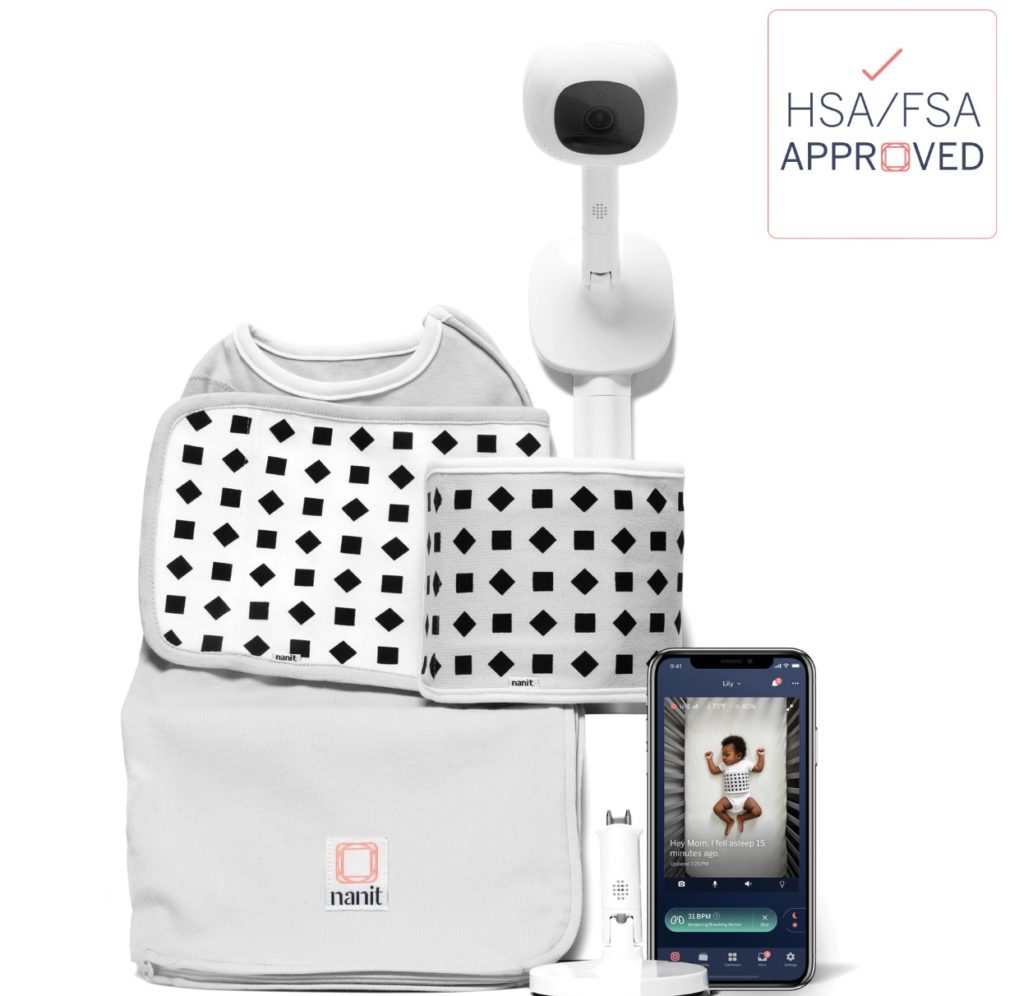
When parents ask the question, “are wifi baby monitors safe?” They’re really asking 4 questions:
- Can wifi baby monitors be hacked?
- What happens when when my wifi goes out?
- What about EMF radiation?
- Ok, given all this, what monitors should I actually consider buying?
We’re going to dive into all 4 of these topics. But, spoiler alert, we think questions 2, 3, and 4 deserve most of your attention. So, feel free to skip ahead by clicking, or tapping:
Wifi baby monitor hacking & security
What happens when your wifi goes out?
Wifi baby monitors and EMF radiation
The only monitors you should consider buying
Question 1: Are wifi baby monitors secure? What about hacking?
Consider the following:
- Just about any device connected to the internet is hackable
- This includes wifi baby monitors
- Non-wifi monitors can also be hacked, but this requires physical proximity and higher skill
- A wifi monitor’s security also depends on your wifi network security
- There’s no financial incentive for hacking a baby monitor. You can’t extract money from the monitor, or from a baby
- Wifi baby monitor companies know that parents are very worried about hacking. So, the big brands (see below) have put tons of money and research into security. All things considered, they’re probably over-engineered from a security perspective.
You are welcome to draw your own conclusion from these statements. Here’s our take: wifi baby monitor hacking is kind of like shark attacks… if the shark had no teeth and the tensile jaw strength of your neighbor’s Chihuahua. That is to say:
- Extremely rare
- Still scary
- Even if it happens, you’re all gonna be fine
Question 2: what happens if my wifi goes out?
Wifi baby monitor companies LOVE to brag about signal quality and 4k resolution. But here’s the thing: a wifi monitor is only as strong as its weakest link. And for most monitors, that’s your wifi network. So, if your wifi sucks or has dead spots or outages—your monitor’s going to as well.
There’s one more potential weak link you also need to worry about with most wifi monitors: your phone, and the monitor’s app. If you’ve got notifications silenced or if the monitor’s app is buggy, you’ve got problems.Knowing this, here’s what your plan needs to be:
- Test the location(s) you plan to have your baby sleep before buying a wifi monitor. Pro tip here: The American Academy of Pediatrics recommends that babies sleep in their parents room (though NOT their parents bed) for the first 6 months. So, if you have trouble watching Netflix in bed, chances are your monitor’s gonna have problems. Go ahead and test the nursery for months 7 onward, too.
- Choose a reputable brand that’s thought through notification strategy and invested in a high quality app for your phone or iPad.
- Consider a monitor with a dedicated “parent unit” (screen). All non-wifi monitors have these, but there are now a few wifi monitor companies that offer dedicated screens, too—more on that below.
Question 3: what about wifi baby monitors and EMF radiation?
If you’ve ever Googled “WiFi baby monitor radiation,” you know it’s a minefield of fear-mongering, marketing spin, and confusing science. Instead of trying to sort internet fact from fiction, I tested some of the most popular monitors myself, using a professional EMF meter and a repeatable setup. My goal? A definitive answer to a question parents have been asking for years—are wifi baby monitors safe, or do they emit harmful EMF radiation?
This is the companion blog post to our video — breaking down how we tested, what we measured, what the science says about those numbers, and how our results compare with published research.
How I tested
- Meter used: TriField TF2 (RF mode, measuring in mW/m²).
- Devices tested: Nanit Pro, Miku Pro, Harbor, Cradlewise, Owlet, Cubo, vtech, Babysense, HelloBaby, Momcozy BM-04. As benchmarks: a cell phone and a WiFi router.
- Setup:
- Monitors mounted as they would be in real life.
- Distances tested: 2′ (approximate Cradlewise crib placement) and 5′ (Nanit wall-mount placement).
- Benchmarks (phone and router) also tested at contact (0″), 2′, and 5′.
- Meter placed at pillow height (baby’s head position), pointed up at the monitor.
- Monitors set to video streaming ON.
- Monitors mounted as they would be in real life.
- Recording: For each run, we logged:
- Average (big bottom number): a rolling time average, sampled at 1s, 10s, 20s, and 30s, then reported as the median.
- Peak (tiny top-left number): the largest burst captured in that window.
- Average (big bottom number): a rolling time average, sampled at 1s, 10s, 20s, and 30s, then reported as the median.
| Device | Distance | Reported Avg (mW/m²) | Reported Peak (mW/m²) | Peak ÷ Avg |
| Nanit Pro | 2′ | 0.051 | 0.434 | 8.6 |
| Nanit Pro | 5′ | 0.032 | 0.170 | 5.3 |
| Miku Pro | 2′ | 0.151 | 0.570 | 3.8 |
| Miku Pro | 5′ | 0.049 | 0.410 | 8.5 |
| Harbor | 2′ | 0.066 | 0.680 | 10.3 |
| Harbor | 5′ | 0.066 | 0.280 | 4.3 |
| Cradlewise | 2′ | 0.300 | 2.600 | 8.7 |
| Momcozy BM-04 | 2′ | 0.221 | 8.63 | 39.1 |
| Momcozy BM-04 | 5′ | 0.074 | 2.00 | 27.0 |
| Cell Phone | Contact | 1.000 | 14.0 | 14.0 |
| 2′ | 0.200 | 1.800 | 9.0 | |
| 5′ | 0.050 | 0.600 | 12.0 | |
| WiFi Router | Contact | 2.000 | 20.0 | 10.0 |
| 2′ | 0.400 | 3.000 | 7.5 | |
| 5′ | 0.080 | 0.800 | 10.0 | |
| Background | – | 0.020 | 0.055 | – |
For those of us who prefer data in graph form, here’s the 2′ and 5′ monitor numbers visualized:

What the science tells us
How to read the numbers:
- Inverse square law: RF power falls quickly with distance. Move from 0″ to 2′ to 5′ and the readings collapse, even when the device is powerful.
- Bursty transmissions: WiFi and phones don’t transmit smoothly. They fire short bursts of high power, which show up in the Peak number. That’s why the Peak ÷ Avg ratio is often 5–10×.
- Relative scale: Phones and routers are much noisier than baby monitors.
- Phones at contact: peaks ~14 mW/m².
- Routers at contact: peaks ~20 mW/m².
- Baby monitors at 2′–5′: peaks <3 mW/m², averages <0.3.
- Phones at contact: peaks ~14 mW/m².
Context: The FCC/ICNIRP public exposure limit is 10,000 mW/m² averaged over time. None of these devices come close. The concern for baby monitors is not raw intensity but chronic proximity — a monitor inches from a baby’s head vs mounted across the room.
Our results vs published research
Published benchmarks line up with what we measured:
- Smart Cam (20 cm, McKenzie 2024): 0.32–0.85 mW/m² averages.
- Baby Monitor (1 m, EMF-Portal): ~0.42 mW/m² average.
- High Exposure Homes (Setia 2025): median ~8.66 mW/m², high tertile ~32 mW/m².
- ICNIRP Public Limit: 10,000 mW/m².
The bottom line
Your choice of monitor matters, but placement matters more.
- At 2′ (Cradlewise distance): hotter than Nanit/Miku/Harbor, but still far below phones or routers.
- At 5′ (Nanit wall-mount distance): monitors blend into background.
- Phones and routers are the bigger offenders in most homes.
👉 Rule of thumb: keep WiFi baby monitors at least 6 feet from your child’s head. That step does more than comparing brand marketing claims.
Methodology and full data
Trial-Level Numbers
| Type | Device | Distance | A Peak | A1 | A2 | A3 | A4 | B Peak | B1 | B2 | B3 | B4 |
|---|---|---|---|---|---|---|---|---|---|---|---|---|
| Background | 0.055 | 0.016 | 0.019 | 0.02 | 0.015 | 0.059 | 0.016 | 0.017 | 0.018 | 0.021 | ||
| Control | Cell Phone | 0″ contact | 15.19 | 0.50 | 0.61 | 0.46 | 0.53 | — | ||||
| 2′ | 0.898 | 0.056 | 0.066 | 0.063 | 0.073 | — | ||||||
| 5′ | — | — | — | — | — | — | ||||||
| Control | Wifi Router | 0″ contact | too hot | 8.98 | 11.73 | 7.23 | 9.4 | — | ||||
| 2′ | 18.3 | 1.16 | 2.01 | 2.6 | 3.4 | — | ||||||
| 5′ | 7.7 | 0.5 | 1.04 | 0.92 | 0.71 | — | ||||||
| Wifi | Cradlewise | 2′ | 2.65 | 0.22 | 0.33 | 0.27 | 0.18 | 2.52 | 0.217 | 0.174 | 0.198 | 0.228 |
| Wifi | Cubo AI | 2′ | 0.941 | 0.10 | 0.092 | 0.15 | 0.107 | 0.837 | 0.095 | 0.084 | 0.093 | 0.091 |
| Wifi | Owlet | 2′ | 0.618 | 0.07 | 0.06 | 0.12 | 0.08 | 0.736 | 0.07 | 0.08 | 0.07 | 0.122 |
| Wifi | Harbor | 2′ | 0.61 | 0.075 | 0.06 | 0.056 | 0.055 | 0.68 | 0.11 | 0.06 | 0.106 | 0.056 |
| Wifi | Miku | 2′ | 0.57 | 0.149 | 0.174 | 0.123 | 0.152 | 0.51 | 0.131 | 0.112 | 0.10 | 0.119 |
| Wifi | Nanit | 2′ | 0.35 | 0.047 | 0.044 | 0.049 | 0.053 | 0.434 | 0.047 | 0.054 | 0.046 | 0.067 |
| Non-Wifi | Baby Sense | 2′ | 12.64 | 4.25 | 4.46 | 4.29 | 4.19 | 13.25 | 4.13 | 4.27 | 4.49 | 4.43 |
| Non-Wifi | VTech | 2′ | 5.21 | 2.20 | 2.19 | 2.11 | 2.25 | 4.52 | 1.54 | 1.39 | 1.74 | 1.58 |
| Non-Wifi | Hello Baby | 2′ | 5.12 | 1.32 | 1.03 | 1.10 | 0.98 | 2.63 | 0.51 | 0.56 | 0.48 | 0.58 |
| Both | Momcozy BM-04 | 2′ | 8.63 | 0.202 | 0.217 | 0.228 | 0.235 | — | ||||
| Wifi | Miku | 5′ | 0.41 | 0.046 | 0.039 | 0.040 | 0.041 | 0.22 | 0.042 | 0.058 | 0.044 | 0.053 |
| Wifi | Owlet | 5′ | 0.322 | 0.24 | 0.24 | 0.24 | 0.24 | 0.403 | 0.25 | 0.26 | 0.26 | 0.25 |
| Wifi | Cubo AI | 5′ | 0.315 | 0.225 | 0.230 | 0.221 | 0.229 | 0.307 | 0.229 | 0.236 | 0.227 | 0.232 |
| Wifi | Harbor | 5′ | 0.28 | 0.061 | 0.065 | 0.074 | 0.066 | 0.25 | 0.069 | 0.058 | 0.060 | 0.059 |
| Wifi | Nanit | 5′ | 0.17 | 0.024 | 0.027 | 0.023 | 0.026 | 0.13 | 0.026 | 0.037 | 0.24 | 0.027 |
| Non-Wifi | VTech | 5′ | 1.21 | 0.33 | 0.23 | 0.19 | 0.26 | 1.06 | 0.37 | 0.44 | 0.33 | 0.39 |
| Non-Wifi | Baby Sense | 5′ | 0.87 | 0.36 | 0.35 | 0.36 | 0.36 | 2.11 | 0.40 | 0.39 | 0.38 | 0.40 |
| Non-Wifi | Hello Baby | 5′ | 0.54 | 0.32 | 0.30 | 0.28 | 0.29 | 1.09 | 0.26 | 0.27 | 0.25 | 0.26 |
| Both | Momcozy BM-04 | 5′ | 2.00 | 0.05 | 0.05 | 0.06 | 0.09 | 1.85 | 0.07 | 0.08 | 0.06 | 0.13 |
All measurements in mW/m² (milliwatts per square meter) using TriField TF2. Scroll horizontally on mobile →
Question 4: so… what monitor should I buy?
Alright, you have the full dataset and testing.
Taking into account EMF data AND which of these monitors are actually good across the other factors I’ve tested, here’s what I think is worthy buying.
If you want the monitor with the absolute lowest EMF ratings, you should go with Nanit. And, bonus, Nanit has been our top monitor pick for many years running—it’s what we’ve used most with our own kids.
Miku and Harbor, two other wifi monitors, also have low EMF levels and are very solid picks. Harbor, the new kid on the block in the wifi baby monitor space, is our up-and-coming pick with its dedicated parent unit and fallback to a local network if your wifi goes out.
If your heart is still set on a non-wifi baby monitor…
Step 1: reconsider. Because the options, when you try to find the center of the venn diagram between 1) lower EMF scores and 2) does not suck, you will find the middle is… kind of empty.
Step 2: Do NOT mount your non-wifi monitor close to your baby. Higher EMF levels need to be countered with distance.
Step 3: Do NOT buy Babysense monitor. Worst EMF ratings AND scored low in our best non-wifi baby monitor testing (our YouTube video here).
Step 4: Choose the Vtech (Amazon). Our top overall non-wifi pick AND much lower EMF readings that Babysense. Hellobaby had a lower reading at 5′, but… it’s unfortunately a POS on just about everything else.
Baby monitor EMF FAQs
What is the Nanit baby monitor EMF exposure level?
The Nanit Baby Monitor has an EMF level of 0.35 mW/m(2) at peak, which puts its EMF exposure at the lowest of popular monitors we tested. Nanit claims its directional Wifi antenna prevents pushing EMF at your baby and, when properly mounted, it seems this is the case. Note we still recommend using the floor or wall stand to ensure the monitor is several feet from your baby’s head.
What is the Owlet baby monitor’s EMF exposure level?
The Owlet Baby Monitor has an EMF level of 0.62 mW/m(2) at peak, which puts its EMF exposure a bit above the lowest monitor we tested (Nanit), but still well below other popular monitors we tested—less than 20x the monitors with the highest levels like Momcozy and Babysense. Please note this is for the camera portion of the Owlet, not the sock. Physical connections like the sock are a different form of connection (BLE vs Wifi) and gives off significantly less radiation… so much so that it might not even register on the TF2 we used to test.
Please note Fathercraft is reader-supported, meaning, at no cost to you, we may earn a commission if you buy after clicking an affiliate link. Learn more. Also, we are a participant in the Amazon Services LLC Associates Program, an affiliate advertising program designed to provide a means for us to earn fees by linking to Amazon.com and affiliated sites. Additionally, this post was originally published in December, 2025, but was updated in April, 2026 with new data, adding the Momcozy BM-04 monitor to the list of monitors we tested for EMF.