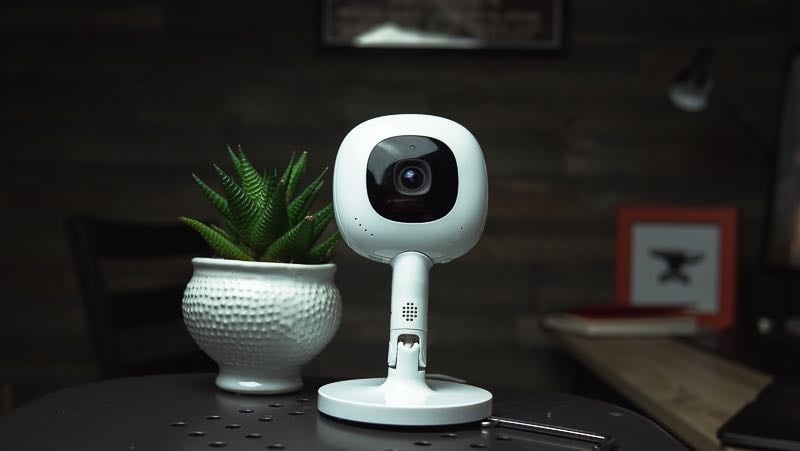

This Nanit Pro review is the latest chapter in a relationship that started in 2018, when we reviewed the original Nanit. We’ve now had Nanit monitors for eight years — through four kids, every hardware generation since the original, in our own homes and shoved into a diaper bag at 5 a.m. for a flight. If you want the short answer to “is the Nanit baby monitor worth it,” it’s: still yes for most parents, and Nanit just closed the one gap people complained about most: as of this year there’s a dedicated screen, so you’re no longer tied to your phone.
We’ve also watched the price creep, the subscription you need for advanced features evolve, and a competitor or two go bankrupt. So this is the good, the annoying, and a clear verdict, updated for 2026 with the new Nanit Home display, current pricing, and what the Insights plans actually cost.
Please note Fathercraft is reader-supported, meaning, at no cost to you, we may earn a commission if you buy after clicking an affiliate link. Learn more.
Nanit Pro review — the quick verdict (2026): After 8 years of testing every Nanit generation since the 2018 original, across four kids, the Nanit Pro is our top overall baby monitor. It’s a 1080p Wi-Fi camera that mounts overhead for a bird’s-eye crib view, with the best picture quality we’ve tested and sleep insights nothing else matches. The camera runs $249 with the travel Flex stand or $289.99 with an overhead floor or wall stand (mount choice doesn’t change the price); the $399 package bundles in the new 8″ Nanit Home display, also $179 on its own, so you’re no longer phone-only. Breathing tracking works via camera-read fabric — nothing on the baby. A subscription isn’t required to monitor; Nanit Insights (free Sleep Plan, $120/yr Memories, $300/yr Milestones) adds sleep data. Best for parents who want the overhead angle and sleep analytics; skip it if you only need to see and hear your baby or have weak Wi-Fi.
After eight years and four kids, the one-line version is simple: the Nanit Pro earns its price if you value the overhead camera angle and the sleep data, and it’s overkill if you just need to see and hear your baby.
8 years of testing · 4 kids · every Nanit generation since 2018
- 🔍 What it is → The Nanit Pro, explained
- 🆕 New 8″ screen → The Nanit Home display ($179)
- ⚙️ How it works → Camera, app & mounts
- 🫁 Breathing → Monitoring with nothing on baby
- 💳 Subscription cost → What Insights really runs
- 🤔 Is it worth it? → The 2026 verdict
- ⚔️ vs. the competition → Owlet, Eufy, CuboAi, Harbor
- ❓ FAQ → Subscription, HSA, Wi-Fi & more
What is the Nanit Pro, exactly?
The Nanit Pro ($249–$399 depending on the stand you choose and whether you add the screen) is a 1080p HD Wi-Fi baby monitor that mounts directly above the crib and looks straight down, giving you a bird’s-eye view of the whole mattress instead of the angled, half-blocked shot you get from a monitor parked on a dresser. That overhead angle is the whole point of Nanit, and it’s the thing the camera’s software is built around: it watches your baby from above, learns the sleep patterns over time, and turns that into alerts and a nightly sleep score in the app.
Nanit calls the broader package a “Smart Baby Monitor System” now, but the camera at the center of it is still the Nanit Pro. The Wall Street Journal once called it “a $249 AI parent who stays up all night logging rollovers and breathing patterns,” which is glib but not wrong. You can run it as a plain live-stream monitor or switch on the sleep analytics, breathing tracking, and milestone capture. More on which of those cost extra below.

New for 2026: the Nanit Home 8″ display
For years our biggest knock on Nanit was that it didn’t include a parent unit — you watched your baby on your phone, full stop. That’s changed. The Nanit Home is an 8″ touchscreen display that gives you a dedicated screen with live HD video, two-way audio, and breathing motion right on the glass. It runs $179 on its own, or you can add it into a new camera package for about $110 (a Pro with the display bundled is $399 versus $289.99 for the camera alone). It needs a Nanit camera to work, it won’t show the deeper sleep dashboards (those stay in the app), but it does split-screen if you’re running more than one camera.
I didn’t expect to like it as much as I do. I don’t love carrying my phone around the house, and the Home display means I don’t have to — I just leave the screen wherever we’re hanging out and glance at it. The bigger win is handoffs: when a babysitter or grandparent is watching the baby, I don’t have to install the app on their phone and walk them through permission sharing. I hand them the screen and it’s ready. The breathing insights show right on the display too, always running, so it’s there at a glance instead of buried a tap deep in an app.
If the no-parent-unit thing was your reason for skipping Nanit, that reason is gone. Worth a look at the Nanit Home display if a dedicated screen is what you’ve been waiting for.
How the Nanit Pro works: camera, app, and mounts
The Nanit Pro splits into three parts: the camera (child unit), the Nanit app or Home display (your viewing screen), and the mount that holds it over the crib. The camera records a true 1080p feed with infrared night vision, and in eight years of testing, it’s the picture quality that still surprises us. Even zoomed in, you get very little of the pixelation that plagues cheaper monitors.
How you mount it decides which features you get. The two overhead options cost the same, and the choice is about your room, not your wallet: a wall mount screws in above the crib and hides the cable for the cleanest, smallest-footprint look, while a floor stand gives you the same bird’s-eye angle without drilling and moves room to room (our pick for rentals or anyone keeping the baby in their room first). Either overhead setup runs $289.99 with the camera alone, or $399 with the 8″ Home display bundled in, and both unlock the full sleep tracking. The Flex stand ($249) is the travel option: a short stand that sits on a dresser with a 130° wide-angle view. It now supports breathing monitoring, but it does not do sleep analytics, since the algorithm needs the straight-down view to work.
| Video | 1080p HD, infrared night vision |
| Viewing | Nanit app (iOS/Android, phone or tablet) or Nanit Home 8″ display ($179) |
| Price | Camera + overhead stand (floor or wall, same price): $289.99 camera-only, or $399 with the 8″ Home display bundled. Flex/travel stand setup: $249. |
| Mounts | Wall mount or floor stand (overhead, full sleep tracking); Flex stand (travel, 130° view, no sleep tracking) |
| Breathing | Camera-read Breathing Wear (no sensor on baby); works on all mounts incl. Flex |
| Sleep tracking | Overhead mounts only (not Flex); Insights plan required |
| Other | Two-way audio, background audio, temp + humidity, nightlight, 256-bit AES encryption |
The camera snaps in and out of any of these in a second, which is the unsung reason Nanit travels so well — grab the camera, grab the Flex stand, and you’re out the door without re-aiming anything when you get home. The app handles the rest: live feed, temperature and humidity readouts, the light, two-way audio, and background audio so you still hear the baby with your phone screen off.
Breathing monitoring without a sensor attached to your baby
Owlet’s Dream Sock pioneered monitoring your baby via sensor (the same tech your doctor uses to check your blood oxygen level at the office). Nanit tracks breathing motion by watching a printed pattern on a band of Breathing Wear — a swaddle, sleeping bag, or pajamas — through the camera. Nothing electronic touches your kid. It’s just fabric with a pattern the camera reads.
In testing we’ve found it reliable, with one catch: you have to lock onto the pattern in the app each time you put the baby down, which is a small hassle that adds up at 2 a.m. Your Pro comes with a 0–3 month band, but continued breathing tracking means buying into the Breathing Wear line as your baby grows, and the full breathing experience wants an Insights plan. If you’re weighing Nanit’s camera-based approach against a wearable, our Owlet review has the head-to-head.
Nanit subscription cost: what the Insights plans actually cost
This is the confusing part. Here’s what you need to know. You do not need a paid subscription to use the Nanit as a monitor. Live HD video, sound and motion alerts, two-way audio, background audio, temperature and humidity, the nightlight, white noise, and up to two caregivers are all free with the camera and a Wi-Fi connection. The subscription, Nanit Insights, only unlocks the sleep data, video history, and memory features.
There are three tiers, all billed annually, and every new Pro now ships with the entry plan free for three months.
| Plan | Price | What you get |
| Sleep (free trial) | Free 3 months, then under $10/mo | Live video, up to 2 caregivers, up to 2 days of sleep analysis |
| Memories | $10/mo or $120/yr | 30 days of sleep analysis, 2 days video history, 10 caregivers, 200 saved memories |
| Milestones | $25/mo or $300/yr | Unlimited sleep analysis, 7 days video history, unlimited caregivers, unlimited memories + milestone tracking |
Prices verified at nanit.com, June 2026. Insights requires an overhead (wall or floor) mount.
The real read after years on these plans: most parents who want the sleep data are happy on Memories at $120/year, and Milestones at $300/year is for people who want unlimited video history and milestone capture and don’t blink at a streaming-service-sized bill. The free Sleep Plan is a real on-ramp, not a trap — you can ride the three months, decide the dashboards aren’t for you, and keep using the monitor for free. One thing to know up front: Insights needs the overhead view, so the sleep features won’t run on the Flex stand. You can compare the tiers on Nanit’s membership page.

Is the Nanit worth it in 2026?
The Nanit Pro is worth it if two things are true for you: you want the overhead camera angle that keeps a rolling baby in frame all night, and you’ll actually use the sleep data. At $249 to $399 for the camera, plus $120 a year if you want the analytics, it’s one of the pricier ways to monitor a baby, and it asks for a reliable Wi-Fi network to do its best work. For that money you get the best picture quality we’ve tested, range that’s limited only by your data connection, and sleep insights nothing else on the market matches.
The Nanit is not worth it if you just need to see and hear your baby from the next room. A good non-Wi-Fi monitor does that for a third of the price with no subscription and no router dependency. And if patchy Wi-Fi is your reality, Nanit will frustrate you — it’s the wrong tool for a house the router can’t reach. We say all of this as people who keep recommending it: the Nanit wins on what it’s built for, not on being the cheapest box that lights up when the baby cries.
Still building out the nursery? Our free new-parent checklists cover what you actually need (and what you can skip) before the baby comes — monitor included.
The good, and the stuff we’d change
What we love. The picture and sound quality are the headline. Eight years in, the clarity of a Nanit Pro feed still beats every monitor we put next to it. The range is effectively unlimited: as long as the camera has Wi-Fi and your phone has Wi-Fi or cell service, you’re connected. Back when my co-founder John was testing the original Nanit with his son Calvin, the moment it clicked was getting a text from Calvin’s grandpa during a workday — “he’s moving around a lot, should I get him up?” — and being able to pull up the feed from the office, see it was just normal stirring, and buy the kid another hour of sleep. That’s the Nanit difference in one story. The overhead angle means a baby can’t roll into a blind corner, and the app’s temperature alerts have saved us a cold-nursery scramble more than once.

What we wish were different. The cost stacks up fast: add the Home display, a Breathing Wear sack, and a Milestones plan and you’re well past the $289.99 sticker price. You can’t rotate the camera’s orientation, so it has to sit on the long side of the crib or your baby ends up tiny in a sea of floor. And the whole thing lives and dies by your Wi-Fi; a great monitor on a bad network is a bad monitor. None of these are dealbreakers for us, but you should walk in knowing them. Nanit has sales often, so check the current price before you pay full freight. At this update they’re throwing in a free Sound + Light machine on orders over $300 and knocking $50 off wall-mount setups.
Nanit vs. the competition
We’ve tested most of what’s worth testing in the baby monitor space. Here’s how the Nanit stacks up against the rivals we currently recommend, with full reviews linked for each.
Nanit vs. Owlet Dream Duo. The real philosophical fork: Owlet reads heart rate and oxygen from a sock on the foot, Nanit reads breathing motion from the camera with nothing on the baby. Owlet gives you the medical-style vitals; Nanit gives you the better picture and the overhead view. Plenty of parents we know run both. Our Owlet review here.
Nanit vs. Eufy. Eufy is our pick when you don’t want Wi-Fi in the loop — it’s a dedicated-screen monitor, cheaper, no subscription, no router dependency. It can’t touch Nanit’s sleep insights or remote viewing, and that’s the trade. Our Eufy baby monitor review here.
Nanit vs. CuboAi. CuboAi is the closest smart-monitor competitor, with strong AI safety alerts and a bundle that’s friendlier on your wallet. Nanit’s sleep analytics and app still feel a step ahead in daily use, but CuboAi closed the gap. That said, Nanit is the premium brand. I trust them. Cubo feels a little more like a no-name company. I don’t know who owns them, or what country the company is located in. Nanit is a real brand I trust is in it for the long-haul. Cubo review here.
Nanit vs. Harbor. Harbor is the newer challenger built around a dedicated display and a slick app. It’s still got some catching up to do, but shows promise and, critically, has no subscription. If the Nanit Home display is what finally sold you on a screen, it’s worth reading our Harbor review before you choose a camp.
For the full field, our best baby monitors roundup sorts every monitor we trust by the kind of parent you are. Nanit’s the winner there, but the right pick depends on whether you’re Team Wi-Fi or not.
Nanit Pro FAQ
Does the Nanit require a subscription?
No. The Nanit Pro works as a full monitor without any paid plan — live HD video, sound and motion alerts, two-way audio, background audio, temperature and humidity, nightlight, and up to two caregivers are all included. A Nanit Insights subscription only adds sleep tracking, video history, and memory features.
How much does the Nanit subscription cost?
Nanit Insights has three annual tiers: a free Sleep Plan (free for three months, then under $10/month), Memories at $120/year, and Milestones at $300/year. The free plan ships with every new Pro camera. Insights requires an overhead mount (wall or floor stand), so the plans don’t run on the Flex stand.
Is the Nanit HSA/FSA eligible?
Yes — the Nanit Pro and Breathing Wear products are typically HSA/FSA eligible, since the breathing monitoring counts as a qualifying health expense. Eligibility can depend on your specific plan, so confirm at checkout.
Does the Nanit work with Alexa and Google Home?
Yes. You can pull up your Nanit live stream and ask about your baby’s night on an Alexa device, and Nanit supports Google Home viewing as well (some voice features need an Insights plan).
Do you need Wi-Fi for the Nanit?
Yes. The Nanit is a Wi-Fi monitor — the camera needs a reliable wireless network to stream and to run its sleep tracking. If your Wi-Fi doesn’t reach the nursery well, a non-Wi-Fi monitor is the better call.
What’s the difference between the Nanit Home display and the app?
The Nanit Home is a $179, 8″ touchscreen (or about $110 bundled with a new camera) that shows live video, two-way audio, and breathing motion on a dedicated screen, so you’re not tied to your phone and you can hand it to a sitter without installing anything. The deeper sleep dashboards still live in the app. The Home display requires a Nanit camera to work.
What’s next?
If you’re reading this, you’re probably deep in the sleep-deprivation phase, or about to be, and the monitor is one piece of a much bigger puzzle. If you haven’t nailed down where the baby actually sleeps yet, that’s the bigger decision, and our SNOO review and Cradlewise review walk through the two smart bassinets we’ve put real nights on. A great monitor over a great sleep setup is the dream; a great monitor over a rough one just gives you a clearer view of the rough one.
If the Wi-Fi-and-radiation question has been nagging at you (it comes up a lot with Nanit specifically), we actually put a meter on ten monitors and wrote up the real EMF data so you can decide with numbers instead of vibes.
And if you’re earlier than all of this, still building the registry and trying to figure out what you actually need, that’s exactly what we made Father’s Ed for — our video class for new and expecting dads, the stuff we wish someone had walked us through before the first kid. You can also come hang out on the Fathercraft YouTube channel, where the Nanit video that started this review lives alongside other gear teardowns and dad-skill breakdowns.
Whatever you pick, the goal’s the same: a little more sleep, a little less worry, and a kid who’s safe in the crib. Nanit’s been our pick for eight years running for getting us there. Go get some rest.
- We are a participant in the Amazon Services LLC Associates Program, an affiliate advertising program designed to provide a means for us to earn fees by linking to Amazon.com and affiliated sites.
- We purchased a Nanit Original for our original review but have received several free monitors from the manufacturer for testing. We never guarantee positive reviews or bias in exchange for a free product, but thought you should be aware.