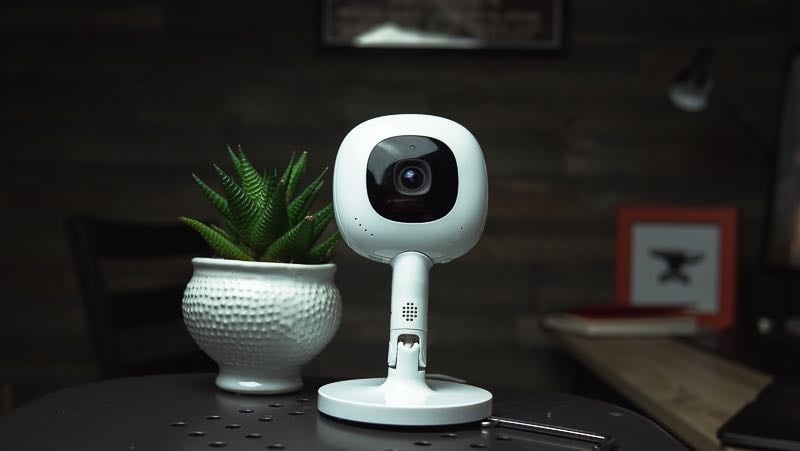

Nanit Smart Baby Monitor System review — the quick verdict (2026): After 8 years of testing every Nanit generation since the 2018 original, across four kids, the Nanit is our top overall baby monitor. It’s a 1080p Wi-Fi camera that mounts overhead for a bird’s-eye crib view, with the solid (though not the best) picture quality we’ve tested and sleep insights nothing else matches. The camera runs $249 with the travel Flex stand or $289.99 with an overhead floor or wall stand (mount choice doesn’t change the price); the $399 package bundles in the new 8″ Nanit Home display, also $179 on its own, so you’re no longer phone-only. Breathing tracking works via camera-read fabric — nothing on the baby. A subscription isn’t required to monitor; Nanit Insights (free Sleep Plan, $120/yr Memories, $300/yr Milestones) adds sleep data. Best for parents who want the overhead angle and sleep analytics; skip it if you only need to see and hear your baby or have weak Wi-Fi.
After eight years and four kids, the one-line version is simple: the Nanit Smart Baby Monitor earns its price if you value the overhead camera angle and the sleep data, and it’s overkill if you just need to see and hear your baby.8 years of testing · 4 kids · every Nanit generation since 2018
- 🔍 What it is → The Nanit, explained
- 🆕 New 8″ screen → The Nanit Home display ($179)
- ⚙️ How it works → Camera, app & mounts
- 🫁 Breathing → Monitoring with nothing on baby
- 💳 Subscription cost → What Insights really runs
- 🤔 Is it worth it? → The 2026 verdict
- ⚔️ vs. the competition → Owlet, Eufy, CuboAi, Harbor
- ❓ FAQ → Subscription, HSA, Wi-Fi & more
What is the Nanit Smart Baby Monitor, exactly?
The Nanit ($249–$399 depending on the stand you choose and whether you add the screen) is a 1080p HD Wi-Fi baby monitor that mounts directly above the crib and looks straight down, giving you a bird’s-eye view of the whole mattress instead of the angled, half-blocked shot you get from a monitor parked on a dresser. That overhead angle is the whole point of Nanit, and it’s the thing the camera’s software is built around: it watches your baby from above, learns the sleep patterns over time, and turns that into notifications and a nightly sleep score in the app. Nanit calls the broader package a “Smart Baby Monitor System” now, but the camera at the center of it is still the Nanit. The Wall Street Journal once called it “a $249 AI parent who stays up all night logging rollovers and breathing patterns,” which is glib but not wrong. You can run it as a plain live-stream monitor or switch on the sleep analytics, breathing tracking, and milestone capture. More on which of those cost extra below.
New for 2026: the Nanit Home 8″ display
For years our biggest knock on Nanit was that it didn’t include a parent unit — you watched your baby on your phone, full stop. That’s changed. The Nanit Home is an 8″ touchscreen display that gives you a dedicated screen with live HD video, two-way audio, and breathing motion right on the glass. It runs $179 on its own, or you can add it into a new camera package for about $110 (a Smart Baby Monitor System with the display bundled is $399 versus $289.99 for the camera alone). It needs a Nanit camera to work, it won’t show the deeper sleep dashboards (those stay in the app), but it does split-screen if you’re running more than one camera. I didn’t expect to like it as much as I do. I don’t love carrying my phone around the house, and the Home display means I don’t have to — I just leave the screen wherever we’re hanging out and glance at it. The bigger win is handoffs: when a babysitter or grandparent is watching the baby, I don’t have to install the app on their phone and walk them through permission sharing. I hand them the screen and it’s ready. The breathing insights show right on the display too, always running, so it’s there at a glance instead of buried a tap deep in an app. If the no-parent-unit thing was your reason for skipping Nanit, that reason is gone. Worth a look at the Nanit Home display if a dedicated screen is what you’ve been waiting for.How the Nanit works: camera, app, and mounts
The Nanit Smart Baby Monitor splits into three parts: the camera (child unit), the Nanit app or Home display (your viewing screen), and the mount that holds it over the crib. The camera records a true 1080p feed with infrared night vision, and in eight years of testing, it’s the picture quality that still surprises us. Even zoomed in, you get very little of the pixelation that plagues cheaper monitors. How you mount it decides which features you get. The two overhead options cost the same, and the choice is about your room, not your wallet: a wall mount screws in above the crib and hides the cable for the cleanest, smallest-footprint look, while a floor stand gives you the same bird’s-eye angle without drilling and moves room to room (our pick for rentals or anyone keeping the baby in their room first). Either overhead setup runs $289.99 with the camera alone, or $399 with the 8″ Home display bundled in, and both unlock the full sleep tracking. The Flex stand ($249) is the travel option: a short stand that sits on a dresser with a 130° wide-angle view. It now supports breathing monitoring, but it does not do sleep analytics, since the algorithm needs the straight-down view to work.| Video | 1080p HD, infrared night vision |
| Viewing | Nanit app (iOS/Android, phone or tablet) or Nanit Home 8″ display ($179) |
| Price | Camera + overhead stand (floor or wall, same price): $289.99 camera-only, or $399 with the 8″ Home display bundled. Flex/travel stand setup: $249. |
| Mounts | Wall mount or floor stand (overhead, full sleep tracking); Flex stand (travel, 130° view, no sleep tracking) |
| Breathing | Camera-read Breathing Wear (no sensor on baby); works on all mounts incl. Flex |
| Sleep tracking | Overhead mounts only (not Flex); Insights plan required |
| Other | Two-way audio, background audio, temp + humidity, nightlight, 256-bit AES encryption |
Breathing monitoring without a sensor attached to your baby
Owlet’s Dream Sock pioneered monitoring your baby via sensor (the same tech your doctor uses to check your blood oxygen level at the office). Nanit tracks breathing motion by watching a printed pattern on a band of Breathing Wear — a swaddle, sleeping bag, or pajamas — through the camera. Nothing electronic touches your kid. It’s just fabric with a pattern the camera reads. In testing we’ve found it reliable, with one catch: you have to lock onto the pattern in the app each time you put the baby down, which is a small hassle that adds up at 2 a.m. Your Nanit comes with a 0–3 month band, but continued breathing tracking means buying into the Breathing Wear line as your baby grows, and the full breathing experience wants an Insights plan. If you’re weighing Nanit’s camera-based approach against a wearable, our Owlet review has the head-to-head.Nanit subscription cost: what the Insights plans actually cost
This is the confusing part. Here’s what you need to know. You do not need a paid subscription to use the Nanit as a monitor. Live HD video, sound and motion notifications, two-way audio, background audio, temperature and humidity, the nightlight, white noise, and up to two caregivers are all free with the camera and a Wi-Fi connection. The subscription, Nanit Insights, only unlocks the sleep data, video history, and memory features. There are three tiers, all billed annually, and every new Nanit now ships with the entry plan free for three months.| Plan | Price | What you get |
| Sleep (free trial) | Free 3 months, then under $10/mo | Live video, up to 2 caregivers, up to 2 days of sleep analysis |
| Memories | $10/mo or $120/yr | 30 days of sleep analysis, 2 days video history, 10 caregivers, unlimited saved memories |
| Milestones | $25/mo or $300/yr | Unlimited sleep analysis, 7 days video history, unlimited caregivers, unlimited memories + milestone tracking |
Prices verified at nanit.com, June 2026. Insights requires an overhead (wall or floor) mount.
The real read after years on these plans: most parents who want the sleep data are happy on Memories at $120/year, and Milestones at $300/year is for people who want unlimited video history and milestone capture and don’t blink at a streaming-service-sized bill. The free Sleep Plan is a real on-ramp, not a trap — you can ride the three months, decide the dashboards aren’t for you, and keep using the monitor for free. One thing to know up front: Insights needs the overhead view, so the sleep features won’t run on the Flex stand. You can compare the tiers on Nanit’s membership page.
Is the Nanit worth it in 2026?
The Nanit is worth it if two things are true for you: you want the overhead camera angle that keeps a rolling baby in frame all night, and you’ll actually use the sleep data. At $249 to $399 for the camera, plus $120 a year if you want the analytics, it’s one of the pricier ways to monitor a baby, and it asks for a reliable Wi-Fi network to do its best work. For that money you get the best picture quality we’ve tested, range that’s limited only by your data connection, and sleep insights nothing else on the market matches. The Nanit is not worth it if you just need to see and hear your baby from the next room. A good non-Wi-Fi monitor does that for a third of the price with no subscription and no router dependency. And if patchy Wi-Fi is your reality, Nanit will frustrate you — it’s the wrong tool for a house the router can’t reach. We say all of this as people who keep recommending it: the Nanit wins on what it’s built for, not on being the cheapest box that lights up when the baby cries. Still building out the nursery? Our free new-parent checklists cover what you actually need (and what you can skip) before the baby comes — monitor included.The good, and the stuff we’d change
What we love. The rock solid reliability, sleep insights, and complete package make Nanit our perennial top pick for parents who want data in addition to monitoring. Eight years in, the overall stability and complete package of a Nanit still beats every monitor we put next to it. The range is effectively unlimited: as long as the camera has Wi-Fi and your phone has Wi-Fi or cell service, you’re connected. Back when my co-founder John was testing the original Nanit with his son Calvin, the moment it clicked was getting a text from Calvin’s grandpa during a workday — “he’s moving around a lot, should I get him up?” — and being able to pull up the feed from the office, see it was just normal stirring, and buy the kid another hour of sleep. That’s the Nanit difference in one story. The overhead angle means a baby can’t roll into a blind corner, and the app’s temperature notifications have saved us a cold-nursery midnight scramble more than once.